mirror of
https://github.com/hanxi/xiaomusic.git
synced 2026-04-26 22:39:51 +08:00

139 lines
4.2 KiB
Markdown
139 lines
4.2 KiB
Markdown
---
|
||
title: 使用cookie登陆
|
||
---
|
||
|
||
# 使用cookie登陆
|
||
|
||
> 使用 cookie 登录可以不需要填账号密码
|
||
|
||
## 步骤
|
||
|
||
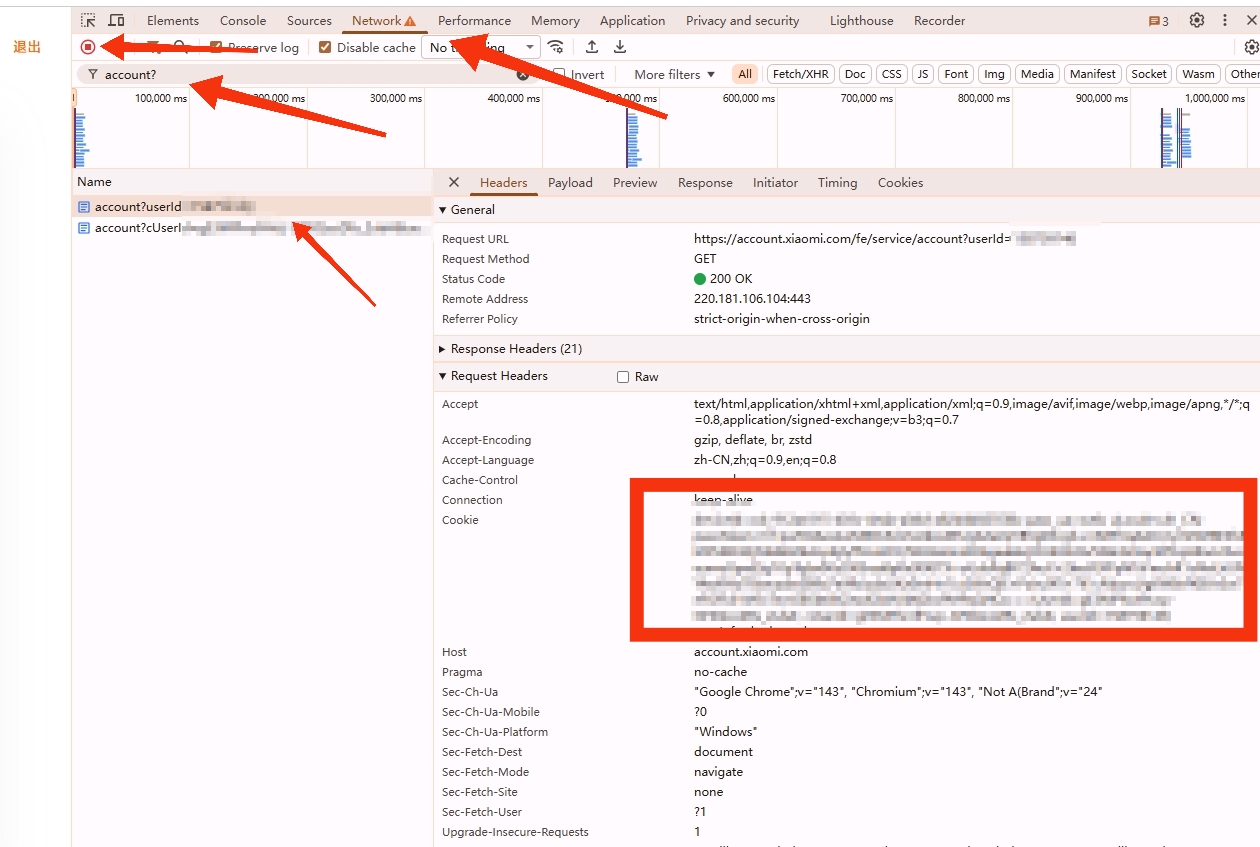
1. 在电脑上使用 Chrome 浏览器登录小米账号官网 👉 <https://account.xiaomi.com/>
|
||
2. 按 `F12` 打开网络工具,点击 `Network` 标签页。
|
||
3. 点击左上角小圆点使其变红色。
|
||
4. 按 `F5` 刷新页面。
|
||
5. 在过滤框里输入 `account?` 过滤出下面的连接,点击连接查看 `cookie` ,复制完整的 `cookie` 值。需要确保复制的 `cookie` 中有 `userId` 和 `passToken` 两个值。
|
||
6. 粘贴到设置页面。
|
||
|
||
## 步骤截图
|
||
|
||
|
||
|
||
<img width="758" height="166" alt="Image" src="https://gproxy.hanxi.cc/proxy/user-attachments/assets/b53de6d9-d4fd-4cfc-8dd3-6f8f4f63de69" />
|
||
|
||
## 评论
|
||
|
||
|
||
### 评论 1 - seryte
|
||
|
||
0.4.12版本测试了使用cookie也无效,是不是cookie还未正确读取?
|
||
|
||
<img width="1017" height="374" alt="Image" src="https://gproxy.hanxi.cc/proxy/user-attachments/assets/8556270f-b2f3-4b07-a951-656a9b76743c" />
|
||
|
||
<img width="1263" height="309" alt="Image" src="https://gproxy.hanxi.cc/proxy/user-attachments/assets/9bd7be41-df3d-4870-a879-66e2a3ce9575" />
|
||
|
||
---
|
||
|
||
### 评论 2 - WGKER
|
||
|
||
局域网内电脑获取完整cookie填入,并且也填写账户密码,仍然无法获取设备。
|
||
可行的话还是换成跳转小米账户授权登录的方式吧,类似小米官方HA插件,目前太折腾了。
|
||
|
||
---
|
||
|
||
### 评论 3 - gdzjy
|
||
|
||
0.4.12登录无效,找不到音箱设备。
|
||
|
||
<img width="1875" height="697" alt="Image" src="https://gproxy.hanxi.cc/proxy/user-attachments/assets/4d5c8bd6-fe00-4dca-b4bc-f9539f16790b" />
|
||
|
||
|
||
---
|
||
|
||
### 评论 4 - swxk521
|
||
|
||
0.4.12一样不行
|
||
|
||
---
|
||
|
||
### 评论 5 - gdzjy
|
||
|
||
发现回到旧版本也找不到设备了,不知是不是小米有ban账号的机制,日志如下:
|
||
|
||
<img width="1621" height="523" alt="Image" src="https://gproxy.hanxi.cc/proxy/user-attachments/assets/848b635d-34d2-458b-b9b8-3d382ef8a52c" />
|
||
|
||
<img width="3029" height="1256" alt="Image" src="https://gproxy.hanxi.cc/proxy/user-attachments/assets/06cecd23-58ca-426b-86f3-465b04515b9e" />
|
||
|
||
---
|
||
|
||
### 评论 6 - hanxi
|
||
|
||
文档更新了,截图还没更新,可以先看。
|
||
|
||
---
|
||
|
||
### 评论 7 - hanxi
|
||
|
||
下个版本可以不用填账号密码,目前0.4.12版本有点bug需要填。
|
||
|
||
---
|
||
|
||
### 评论 8 - seryte
|
||
|
||
> 文档更新了,截图还没更新,可以先看。
|
||
|
||
也还是不行 😂
|
||
|
||
<img width="1896" height="529" alt="Image" src="https://gproxy.hanxi.cc/proxy/user-attachments/assets/b3eb56bd-a22f-4664-848d-95ae87262528" />
|
||
|
||
<img width="983" height="769" alt="Image" src="https://gproxy.hanxi.cc/proxy/user-attachments/assets/1669bdf3-f5b5-4285-a5c0-d8b9d9c21cff" />
|
||
|
||
---
|
||
|
||
### 评论 9 - hanxi
|
||
|
||
需要填账号,或者用测试版本。
|
||
|
||
---
|
||
|
||
### 评论 10 - seryte
|
||
|
||
> 需要填账号,或者用测试版本。
|
||
|
||
`hanxi/xiaomusic main d1d275ae0e98 About an hour ago 341MB`
|
||
测试版本能发现设备,但是还是无法播放本地歌曲,播放歌曲时会再次登录失败, 然后没过2分钟,设备再次消失,日志出现需要验证码的信息
|
||
|
||
<img width="580" height="625" alt="Image" src="https://gproxy.hanxi.cc/proxy/user-attachments/assets/d8f4bf43-7333-4146-98b6-0e5a2335b225" />
|
||
|
||
<img width="1894" height="947" alt="Image" src="https://gproxy.hanxi.cc/proxy/user-attachments/assets/c075364e-9624-4a04-9486-208e246d00ac" />
|
||
|
||
<img width="1539" height="127" alt="Image" src="https://gproxy.hanxi.cc/proxy/user-attachments/assets/3ca27f19-f317-4f69-b723-7ea624db78ff" />
|
||
|
||
---
|
||
|
||
### 评论 11 - sam0773
|
||
|
||
填写cookies时候要加上_utm_data={""}吗?直接复制进去保存时候会弹出[object object]
|
||
|
||
---
|
||
|
||
### 评论 12 - figsong
|
||
|
||
|
||
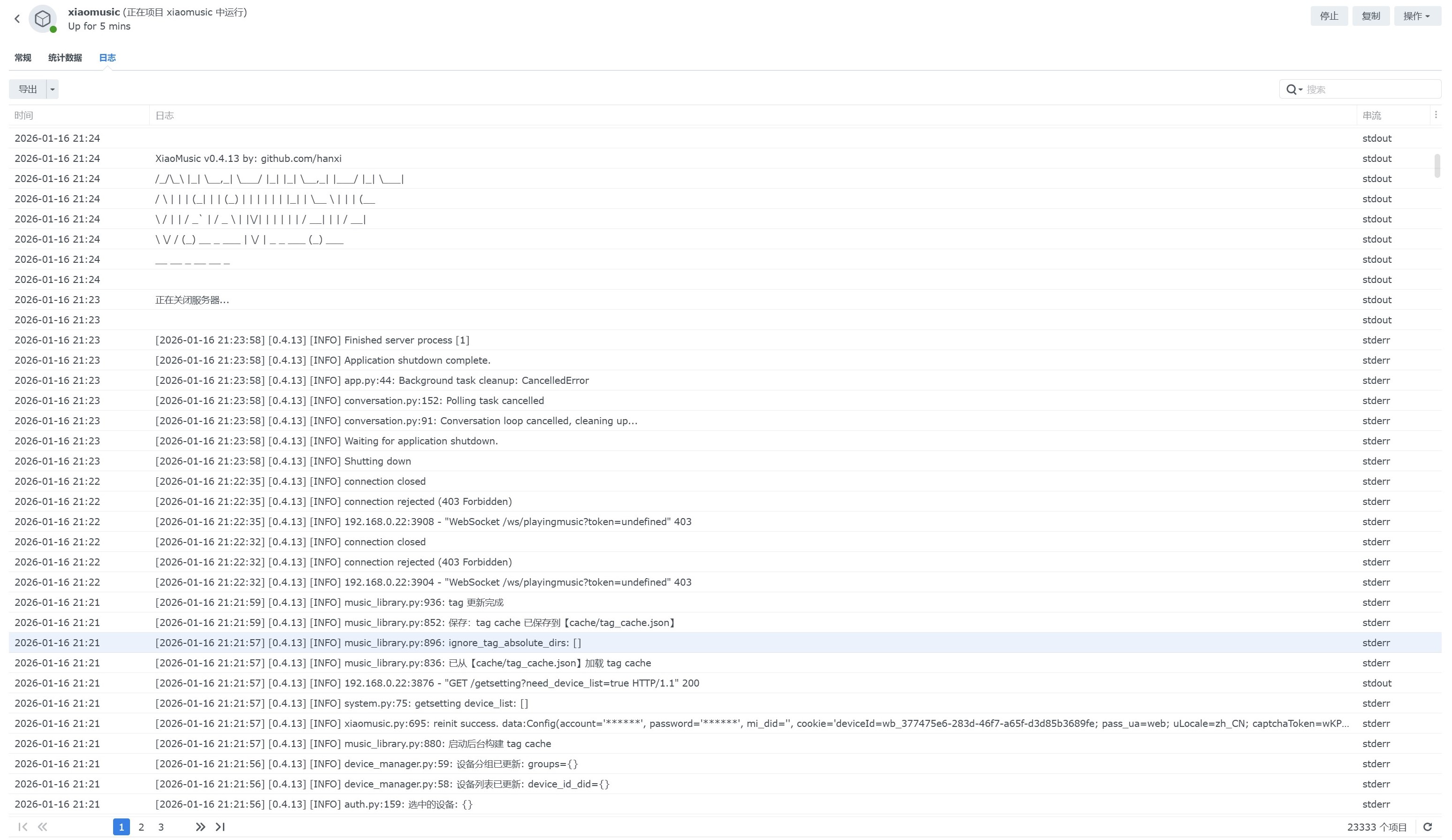
0.4.13版单用cookies、cookies加上账号密码依然不能发现设备
|
||
|
||
---
|
||
|
||
### 评论 13 - hanxi
|
||
|
||
需要确保复制的 cookie 中有 userId 和 passToken 两个值。
|
||
|
||
---
|
||
|
||
### 评论 14 - hanxi
|
||
|
||
需要确保复制的 cookie 中有 userId 和 passToken 两个值。
|
||
|
||
---
|
||
[链接到 GitHub Issue](https://github.com/hanxi/xiaomusic/issues/688)
|