mirror of
https://github.com/adminlove520/AI-Account-Toolkit.git
synced 2026-05-16 09:26:46 +08:00

188 lines
5.0 KiB
Markdown
188 lines
5.0 KiB
Markdown
<div align="center">
|
||
|
||
# OB1-2API
|
||
|
||
**将 [OB-1](https://openblocklabs.com) AI 服务转为 OpenAI 兼容 API**
|
||
|
||
[快速开始](#快速开始) | [功能特性](#功能特性) | [配置说明](#配置说明) | [API 文档](#api-接口)
|
||
|
||
</div>
|
||
|
||
## 功能特性
|
||
|
||
- 🔄 **OpenAI 兼容** — `/v1/chat/completions`、`/v1/models`,直接对接主流客户端
|
||
- 👥 **多账号轮换** — 缓存优先 / 平衡轮换 / 性能优先三种调度策略
|
||
- 🔐 **自动 Token 管理** — 基于 WorkOS OAuth 设备授权,自动续期,401 即时重试
|
||
- 📡 **流式输出** — 完整 SSE 流式响应,实时返回生成内容
|
||
- 🖥️ **Web 管理面板** — 账号、API Key、系统设置、设备授权一站式操作
|
||
- ⚡ **热重载配置** — 后台修改即时生效,无需重启服务
|
||
- 🌐 **代理支持** — HTTP 代理配置,可视化连通性测试
|
||
|
||
## 快速开始
|
||
|
||
### 直接运行
|
||
|
||
```bash
|
||
# 克隆项目
|
||
git clone https://github.com/longnghiemduc6-art/ob12api.git
|
||
cd ob12api
|
||
|
||
# 安装依赖
|
||
pip install -r requirements.txt
|
||
|
||
# 启动服务
|
||
python main.py
|
||
```
|
||
|
||
### Docker 部署
|
||
|
||
```bash
|
||
docker run -d \
|
||
--name ob12api \
|
||
-p 8081:8081 \
|
||
-v ./config:/app/config \
|
||
-v ./data:/app/data \
|
||
ob12api
|
||
```
|
||
|
||
### Docker Compose
|
||
|
||
```yaml
|
||
version: '3.8'
|
||
services:
|
||
ob12api:
|
||
build: .
|
||
ports:
|
||
- "8081:8081"
|
||
volumes:
|
||
- ./config:/app/config
|
||
- ./data:/app/data
|
||
restart: unless-stopped
|
||
```
|
||
|
||
服务启动后访问 `http://localhost:8081` 进入管理面板。
|
||
|
||
## 配置说明
|
||
|
||
编辑 `config/setting.toml`:
|
||
|
||
```toml
|
||
[global]
|
||
api_key = "your-api-key" # 客户端调用使用的 API Key
|
||
|
||
[server]
|
||
host = "0.0.0.0"
|
||
port = 8081
|
||
|
||
[admin]
|
||
username = "admin"
|
||
password = "admin" # ⚠️ 请务必修改默认密码
|
||
|
||
[proxy]
|
||
url = "" # HTTP 代理地址(可选)
|
||
|
||
[ob1]
|
||
rotation_mode = "cache-first" # 调度模式:cache-first / balanced / performance
|
||
|
||
[logging]
|
||
level = "INFO" # 日志级别:DEBUG / INFO / WARNING / ERROR
|
||
```
|
||
|
||
## 添加账号
|
||
|
||
进入管理面板后,支持两种方式添加 OB-1 账号:
|
||
|
||
| 方式 | 说明 |
|
||
|------|------|
|
||
| **设备授权** | 点击「设备授权」按钮,获取授权码后在 OB-1 网站完成授权 |
|
||
| **JSON 导入** | 批量导入已有账号的 JSON 数据 |
|
||
|
||
## 调度模式
|
||
|
||
| 模式 | 策略 | 适用场景 |
|
||
|------|------|----------|
|
||
| `cache-first` | 优先使用上次成功的账号,减少切换开销 | 稳定使用 |
|
||
| `balanced` | 轮流使用各账号,均衡分配请求负载 | 日常使用,延长账号寿命 |
|
||
| `performance` | 随机选择可用账号,分散请求压力 | 高并发场景 |
|
||
|
||
## API 接口
|
||
|
||
### 获取模型列表
|
||
|
||
```bash
|
||
curl http://localhost:8081/v1/models \
|
||
-H "Authorization: Bearer your-api-key"
|
||
```
|
||
|
||
### 对话补全(流式)
|
||
|
||
```bash
|
||
curl http://localhost:8081/v1/chat/completions \
|
||
-H "Authorization: Bearer your-api-key" \
|
||
-H "Content-Type: application/json" \
|
||
-d '{
|
||
"model": "anthropic/claude-sonnet-4",
|
||
"messages": [{"role": "user", "content": "Hello"}],
|
||
"stream": true
|
||
}'
|
||
```
|
||
|
||
### 对话补全(非流式)
|
||
|
||
```bash
|
||
curl http://localhost:8081/v1/chat/completions \
|
||
-H "Authorization: Bearer your-api-key" \
|
||
-H "Content-Type: application/json" \
|
||
-d '{
|
||
"model": "anthropic/claude-sonnet-4",
|
||
"messages": [{"role": "user", "content": "Hello"}],
|
||
"stream": false
|
||
}'
|
||
```
|
||
|
||
## 项目结构
|
||
|
||
```
|
||
ob12api/
|
||
├── main.py # 启动入口
|
||
├── requirements.txt # Python 依赖
|
||
├── config/
|
||
│ ├── setting.toml # 配置文件
|
||
│ ├── accounts.json # 账号数据(自动生成)
|
||
│ └── api_keys.json # API Key 数据(自动生成)
|
||
├── data/
|
||
│ └── tokens.json # OAuth Token 存储
|
||
├── src/
|
||
│ ├── main.py # FastAPI 应用
|
||
│ ├── api/
|
||
│ │ ├── routes.py # OpenAI 兼容路由
|
||
│ │ └── admin.py # 管理后台接口
|
||
│ ├── core/
|
||
│ │ ├── config.py # 配置加载(热重载)
|
||
│ │ ├── auth.py # 认证鉴权
|
||
│ │ ├── models.py # 请求/响应模型
|
||
│ │ └── logger.py # 日志系统
|
||
│ └── services/
|
||
│ ├── token_manager.py # Token 生命周期管理
|
||
│ ├── ob1_client.py # OB-1 API 客户端
|
||
│ └── api_key_manager.py # API Key 管理
|
||
└── static/ # 管理面板前端资源
|
||
```
|
||
|
||
## 环境要求
|
||
|
||
- Python >= 3.11
|
||
- 依赖:FastAPI, uvicorn, httpx, PyJWT, tomli_w
|
||
|
||
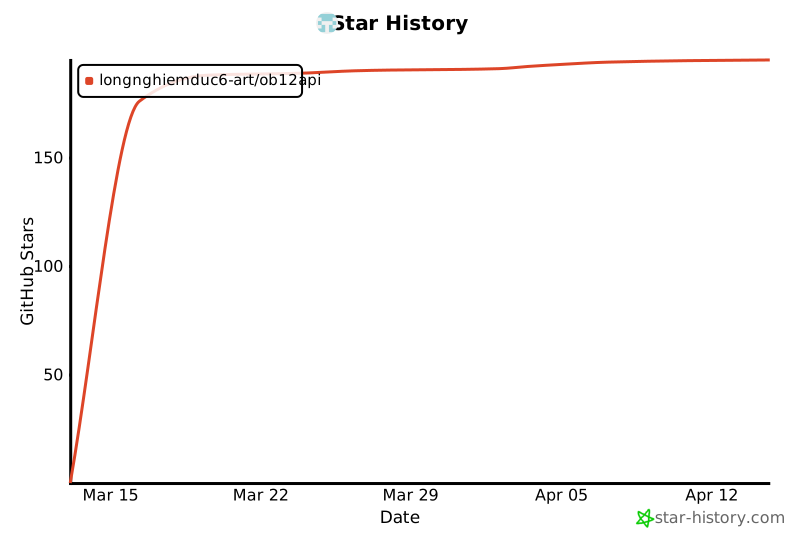
## Star History
|
||
|
||
[](https://star-history.com/#longnghiemduc6-art/ob12api&Date)
|
||
|
||
## 免责声明
|
||
|
||
**本项目仅供学习和研究用途,不得用于商业目的。使用者应遵守相关服务条款和法律法规,因使用本项目产生的任何后果由使用者自行承担。**
|
||
|
||
## License
|
||
|
||
MIT
|