mirror of
https://jihulab.com/DGP-Studio/Snap.Hutao.Docs.git
synced 2025-11-19 21:16:31 +08:00

117 lines
5.0 KiB
Markdown
117 lines
5.0 KiB
Markdown
---
|
||
headerDepth: 2
|
||
category: [Feature, Tutorial]
|
||
tag:
|
||
[Snap Hutao Cloud, Geetest verification, Language settings, Advanced settings]
|
||
order: 15
|
||
comment: false
|
||
---
|
||
|
||
# Software Settings
|
||
|
||
|
||
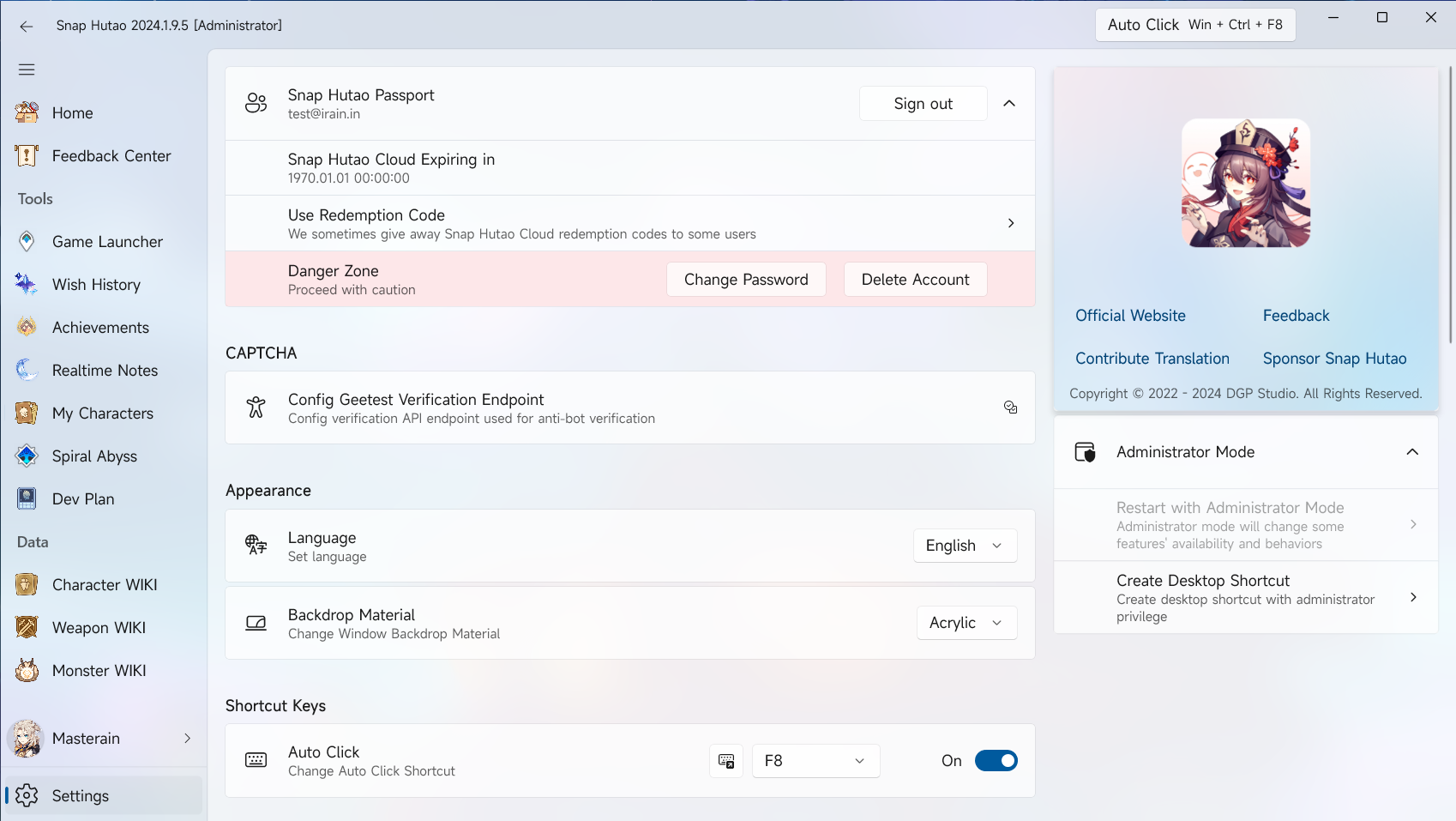
The following feature tutorials are introduced in-program order.
|
||
|
||
## About Snap Hutao
|
||
|
||
This part has the following information:
|
||
|
||
- The icon of Snap Hutao:You can find the original image of the icon at the [home page](/)
|
||
- The artist is [画画的芦苇 (BiliBili)](https://space.bilibili.com/274422134)
|
||
::: details Drawing Process
|
||
<BiliBili bvid="BV1UL411d7Py" />
|
||
:::
|
||
- [DGP-Studio](https://github.com/DGP-Studio) is authorized by owner to use it for Snap Hutao Project
|
||
|
||
## Snap Hutao Account
|
||
|
||
You can sign up and sign in your Snap Hutao Account in settings page.
|
||
|
||
For more detail about this feature, please refer to [Snap Hutao Account](hutao-passport.md) document.
|
||
|
||
## Administrator Mode Tools
|
||
|
||
On the right side of the settings page, the development team has set up an administrator mode tool for users who need it. Under this module, we provide two functions:
|
||
|
||
1. Restart the program immediately as an administrator
|
||
2. Create a PowerShell shortcut on the desktop to start Hutao as administrator
|
||
|
||
## CAPTCHA
|
||
|
||
> This feature is most likely to be useful for CN server (MiYouShe) users
|
||
|
||
If daily check-in and realtime notes functions are essential for you, then the `-1034` error from miHoYo's anti-bot verification will definitely be a major interference. This is because miHoYo uses Geetest to intercept requests directly executed by non-humans, and some requests from Snap Hutao will be judged by Geetest as robot behavior and cause request failure. If you use a third-party service to verify the Geetest captcha, you can pass the random data generated by Geetest to the verification service provider through this setting.
|
||
|
||
After successfully configuring this setting, Snap Hutao will directly call this verification service to pass the Geetest verification when performing real-time note automatic refresh and miHoYo community check-in, avoiding the generation of -1034 error by miHoYo.
|
||
|
||
## Appearance
|
||
|
||
- Language
|
||
|
||
- Snap Hutao will following system language setting by default
|
||
- You can force to change to another language in the settings page
|
||
|
||
- Backdrop Material
|
||
- In this option, you can change the backdrop material of the software to
|
||
- Acrylic
|
||
- Mica (Windows 11 only)
|
||
- MicaAlt (Windows 11 only)
|
||
- The setting will take effect immediately
|
||
|
||
## Shortcut Keys
|
||
|
||
In this module, you can enable and change the setting of auto-click shortcut key
|
||
|
||
## Home
|
||
|
||
- Dashboard Card
|
||
- You can click on this option to switch display of card on Home Dashboard
|
||
- Game Launcher
|
||
- Wish History
|
||
- Achievement
|
||
- Realtime Notes
|
||
- Announcement Server
|
||
- You can change source of in-game announcement in this field
|
||
|
||
## Game
|
||
|
||
- Delete Game Embedded Browser Web Cache
|
||
- When you are using web cache refresh method in the wish history feature and receiving authkey expiration error, you can try this operation to fix the error
|
||
- Click on this field to execute the operation
|
||
|
||
## Wish History
|
||
|
||
- In this field, you can choose to hide wish event that you do not have any record in the period in the wish export feature
|
||
|
||
## Storage
|
||
|
||
- Data Folder
|
||
- `Open Folder`: Click this field to open data folder that contains user data, log, and metadata
|
||
- `Change Data Directory`: This field allows you to change the data directory to path you want
|
||
- `Delete Server Conversion Cache`: This option allows user to delete server conversion cache file inside of data folder
|
||
- Cache Folder
|
||
- `Open Folder`: Click this field will open cache folder that saves image assets used by Snap Hutao
|
||
- `Reset Image Resource`: This option allows user to reset image cache when there are too many image failed to load. The program will re-download images resource at next start-up
|
||
|
||
## Dangerous Features
|
||
|
||
::: important
|
||
Using any feature within the "Dangerous Features" will trigger a secondary confirmation prompt. You may be asked to enter the **title name** of the feature that is currently being requested to be enabled.
|
||
:::
|
||
|
||
- Debug Console
|
||
- After enabling this feature, a command line window containing real-time logs will be enabled the next time you start the Hutao Toolbox. You can obtain error information that may be helpful to you through this window.
|
||
- Advanced Features
|
||
- With Snap Hutao running as administrator, you can enable this field to enable advanced features in the game launcher
|
||
> For reference:
|
||
>
|
||
> [Snap Hutao Terms of Service](../statements/tos.html)
|
||
>
|
||
> [Genshin Impact Terms of Service (CN server/Chinese)](https://ys.mihoyo.com/main/company/agreement)
|
||
>
|
||
> [Genshin Impact Terms of Service (Oversea servers/English)](https://genshin.hoyoverse.com/en/company/terms)
|
||
- Delete All Users
|
||
- Execute this operation will delete all user data in Snap Hutao
|
||
- Click on the field to operate, you will be asked to confirm
|
||
- In most scenario, you don't need to use this field
|