mirror of
https://jihulab.com/DGP-Studio/Snap.Hutao.Docs.git
synced 2025-11-19 21:16:31 +08:00

63 lines
3.6 KiB
Markdown
63 lines
3.6 KiB
Markdown
---
|
|
headerDepth: 2
|
|
category: [Feature, Tutorial]
|
|
tag: [MiYouShe, HoYoLAB, Multi account, check-in]
|
|
order: 14
|
|
comment: false
|
|
description: The Multi-account Panel feature in Snap Hutao allows users to log in with multiple miHoYo BBS accounts within the toolbox and switch between them freely. This enables users to utilize various functions within Snap Hutao with different accounts for specific purposes.
|
|
banner: https://opengraph.snapgenshin.cn/generate?url=https://hut.ao/en/features/mhy-account-switch.html
|
|
---
|
|
|
|
# MiHoYo BBS Account Switch
|
|
|
|
::: tip
|
|
|
|
There are two types of MiHoYo BBS, MiYouShe and HoYoLAB.
|
|
MiYouShe refers to Mainland China version, HoYoLAB refers to global version, both of them are accepted by Snap Hutao
|
|
|
|
- The document in page is talking about **MiHoYo BBS account**, not Genshin Impact's **in-game account**
|
|
- Before starting using Snap Hutao, you must initial your MiHoYo BBS account by login to your account in official mobile application
|
|
- If your account name shows like `user_123456789`, then it means the account is not initial yet
|
|
|
|
:::
|
|
|
|
|
|
|
|
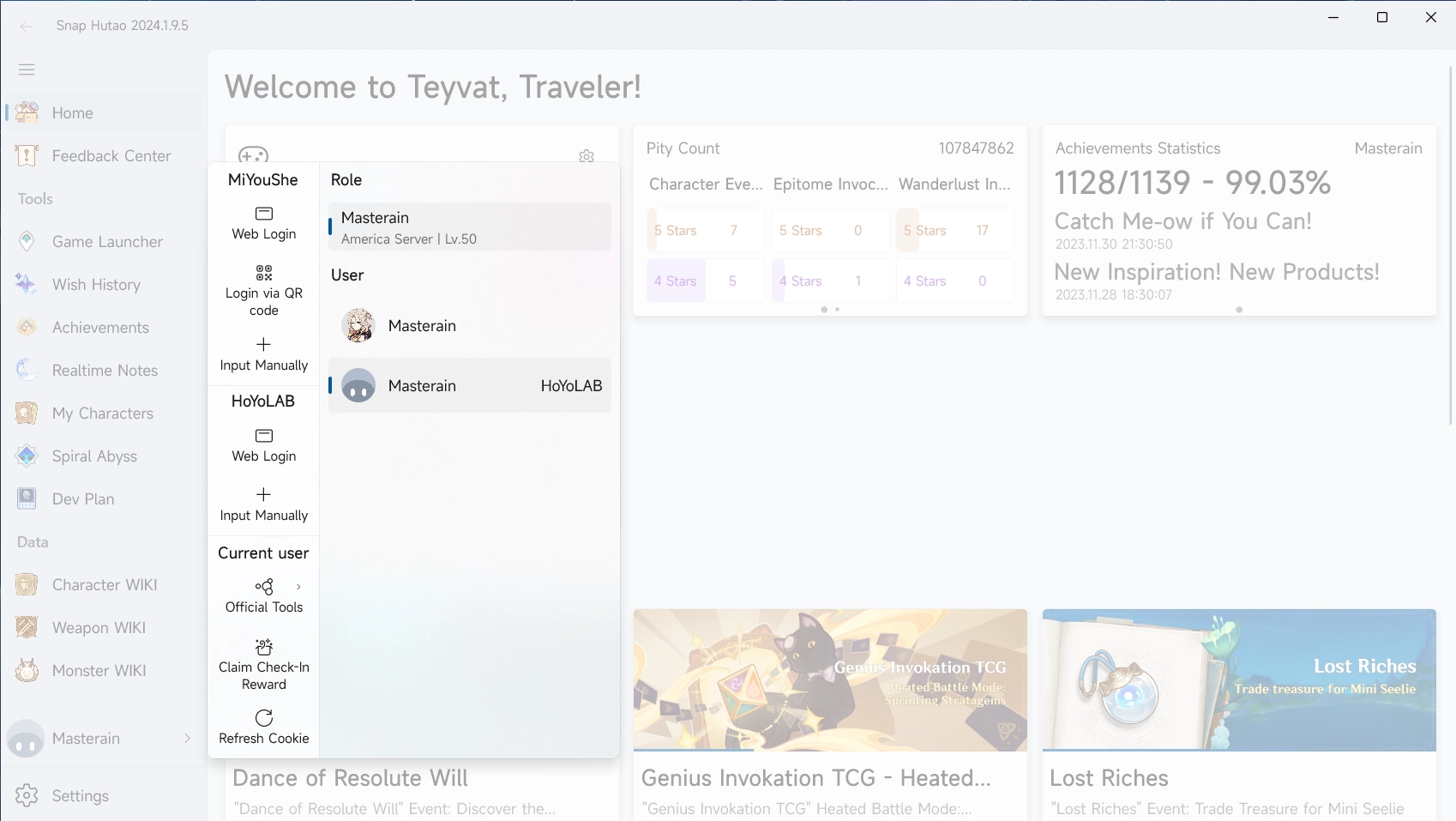
At the left bottom corner, you can find the account menu above the `Settings` button. In the pop-up account menu,
|
|
you can find the entry to login in to your MiYouShe and HoYoLAB account:
|
|
|
|
- Click on `Web Login`
|
|
- In the pop-up build-in browser, login with your account
|
|
- Click `I'm logged in` button on the top right, after you have logged into your account
|
|
- Then your account will be added to Snap Hutao, the browser will close automatically
|
|
- Alternatively, you can enter your MiHoYo BBS cookie list by click on `Input Manually` button
|
|
- If you do so, the cookies must contains `SToken` field
|
|
- After added your MiHoYo BBS account, you need to switch to account you want in the account menu, to activate it
|
|
- You can always switch your MiHoYo BBS account in the account menu, and you are also allowed to copy account's cookie or remove account there
|
|
- After select an account in the panel, you can also
|
|
- Click `Refresh Cookie` to update local cookie
|
|
- Click `Claim Check-In Reward` to get daily check-in reward. For MiYouShe account, you need to bypass Geetest verification first.
|
|
|
|
::: info Security Tips
|
|
|
|
- `SToken` is a security sensitive cookie field, you **should NEVER** store it in cloud-based software or device that you cannot guarantee the safety (such as public computers).
|
|
- You can copy accounts' cookie with `SToken` from Snap Hutao, but you should carefully consider if the receiver is trustworthy to have `SToken` cookie
|
|
- **When you are signing in to your MiHoYo BBS account in Snap Hutao, the data are only been processed by MiHoYo's official server and local Snap Hutao program,
|
|
no third-party server (including any server from Snap Hutao) will involve in this process.**
|
|
|
|
:::
|
|
|
|
## FAQ
|
|
|
|
### MiHoYo BBS Account often Lose Login Status
|
|
|
|
Snap Hutao use saved MiHoYo BBS cookies to maintain login status. If you **log out** your account in your browser or
|
|
other device, cookie will become invalid, and Snap Hutao will also be forced to log out, account will be automatically
|
|
removed.
|
|
|
|
This problem may also be caused by network error, you should check this first; If it's not caused by network issue,
|
|
you can use `Refresh Cookie` in the account panel; You can also remove your account manually and add it back again.
|
|
|
|
Since October 2022, MiYouShe (Chinese BBS) rapidly increased bot detection and may set users' account as under-risk status,
|
|
this may cause Snap Hutao failed to check validation of the cookie
|