mirror of
https://jihulab.com/DGP-Studio/Snap.Hutao.Docs.git
synced 2025-11-19 21:16:31 +08:00

95 lines
3.5 KiB
Markdown
95 lines
3.5 KiB
Markdown
---
|
|
headerDepth: 0
|
|
category: [Feature, Tutorial]
|
|
tag: [Character showcase, Character statistics]
|
|
order: 8
|
|
comment: false
|
|
---
|
|
|
|
# My Characters
|
|
|
|
::: info
|
|
|
|
This features required sign in to MiHoYo BBS account, please refer to [MiHoYo BBS Account Switch](mhy-account-switch.md) document for sign in tutorial
|
|
|
|
:::
|
|
|
|
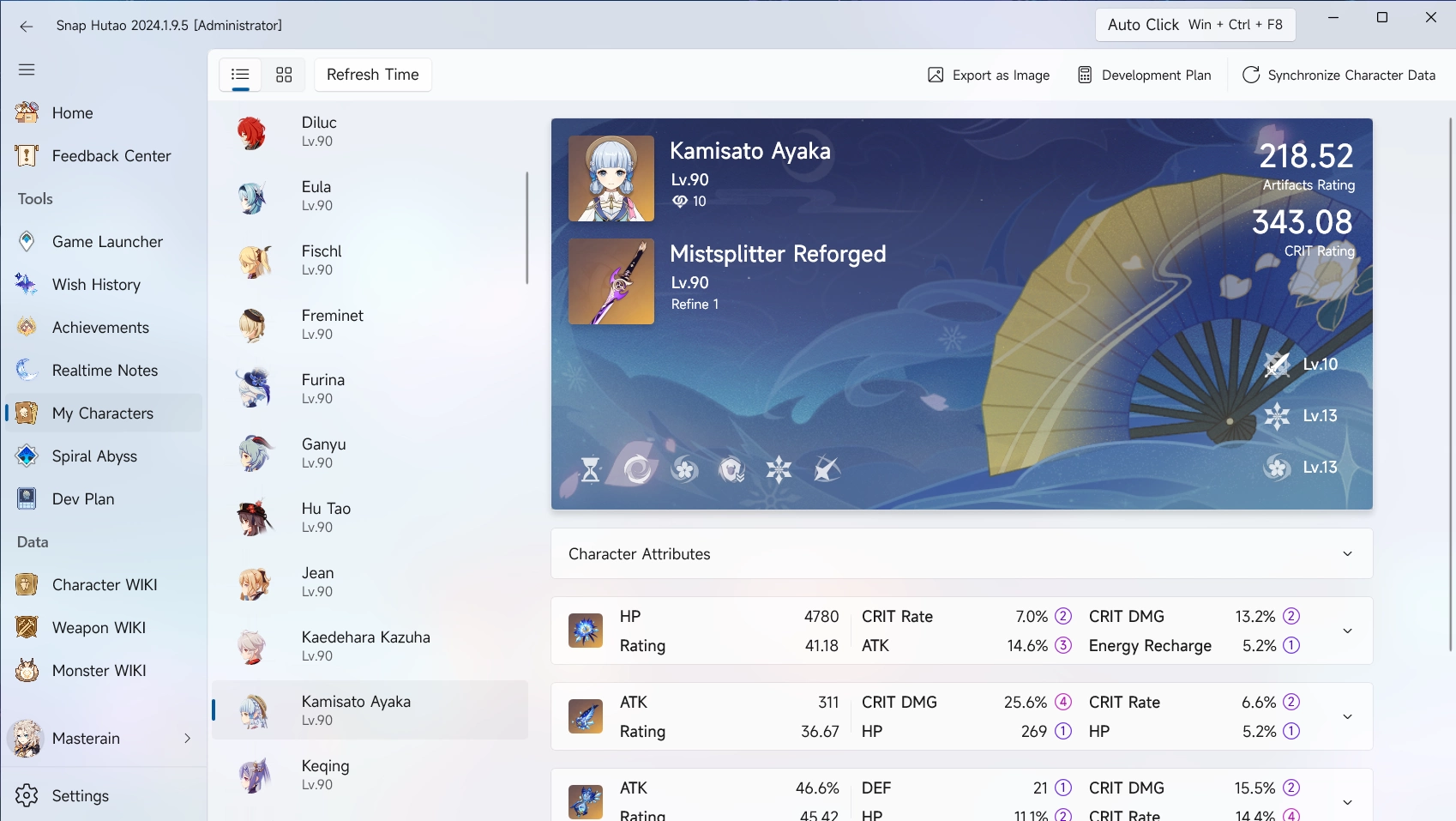
My characters is a character statistics feature that allows Snap Hutao to read character's statistics on the account,
|
|
including level, constellation, weapon, talent and artifact set; we also provide artifacts rating and CRTI rating for
|
|
each character.
|
|
|
|
|
|
|
|
## Sync Character Data
|
|
|
|
Recommended usage:
|
|
|
|
1. Use `Sync from MiHoYo BBS - Battle Chronicle`
|
|
2. Use `Sync from MiHoYo BBS - Development Plan`
|
|
3. Edit the showcase in the game and then `Sync from Enka API`
|
|
|
|
### Sync from Enka API
|
|
|
|
::: info Synchronous Feature
|
|
|
|
- Enka API sync data from characters displayed in the in-game character showcase
|
|
- Data includes Artifacts detail data, weapon detail data, talent data
|
|
- Character costume
|
|
- This sync method only support 8 characters at a time
|
|
|
|
:::
|
|
|
|
- In the game, put **characters that you need detailed data** into the showcase
|
|
- The character showcase allows up to 8 characters at the same time
|
|
- You need to wait for data sync to complete after editing the showcase configuration
|
|
- You may need up to 5 minutes after enable the showcase or re-config the showcase
|
|
- Enter `My Characters` page in the Snap Hutao, Click `Sync Character Data` button on the top-right
|
|
- Select `Sync from Enka API`
|
|
|
|
### Sync from MiHoYo BBS - Battle Chronicle
|
|
|
|
::: info Synchronous Feature
|
|
|
|
- Data in this sync method comes from My Characters feature in MiHoYo official BSS
|
|
- This method does not contain any artifacts data
|
|
- This method can sync all characters data at a time
|
|
|
|
:::
|
|
|
|
- Enter `My Characters` page in the Snap Hutao, Click `Sync Character Data` button on the top-right
|
|
- Select `Sync from MiHoYo BBS My Characters`
|
|
|
|
### Sync from MiHoYo BBS - Development Plan
|
|
|
|
::: info Synchronous Feature
|
|
|
|
- Data in this method comes from `Enhancement Progression Calculator` feature in MiHoYo official BBS tool set
|
|
- This sync method contains talent level data
|
|
- This sync method can sync all characters data at a time
|
|
|
|
:::
|
|
|
|
- Enter `My Characters` page in the Snap Hutao, Click `Sync Character Data` button on the top-right
|
|
- Select `Sync from MiHoYo BBS Developement Plan`
|
|
|
|
## Add Selected Character to Development Plan
|
|
|
|
- Enter `My Characters` page in the Snap Hutao, click on character you need to add to development plan
|
|
- Click on `Development Plan` and enter target level
|
|
- **Synchronized data of the character** will be pre-filled into current level, and you can change the target level
|
|
|
|

|
|
|
|
- After adding successfully, you can find added development plan in the `Dev Plan` page in Snap Hutao
|
|
|
|
For tutorial of Dev Plan feature, please refer to [Dev Plan](develop-plan.md) document
|
|
|
|
## Export as Image
|
|
|
|
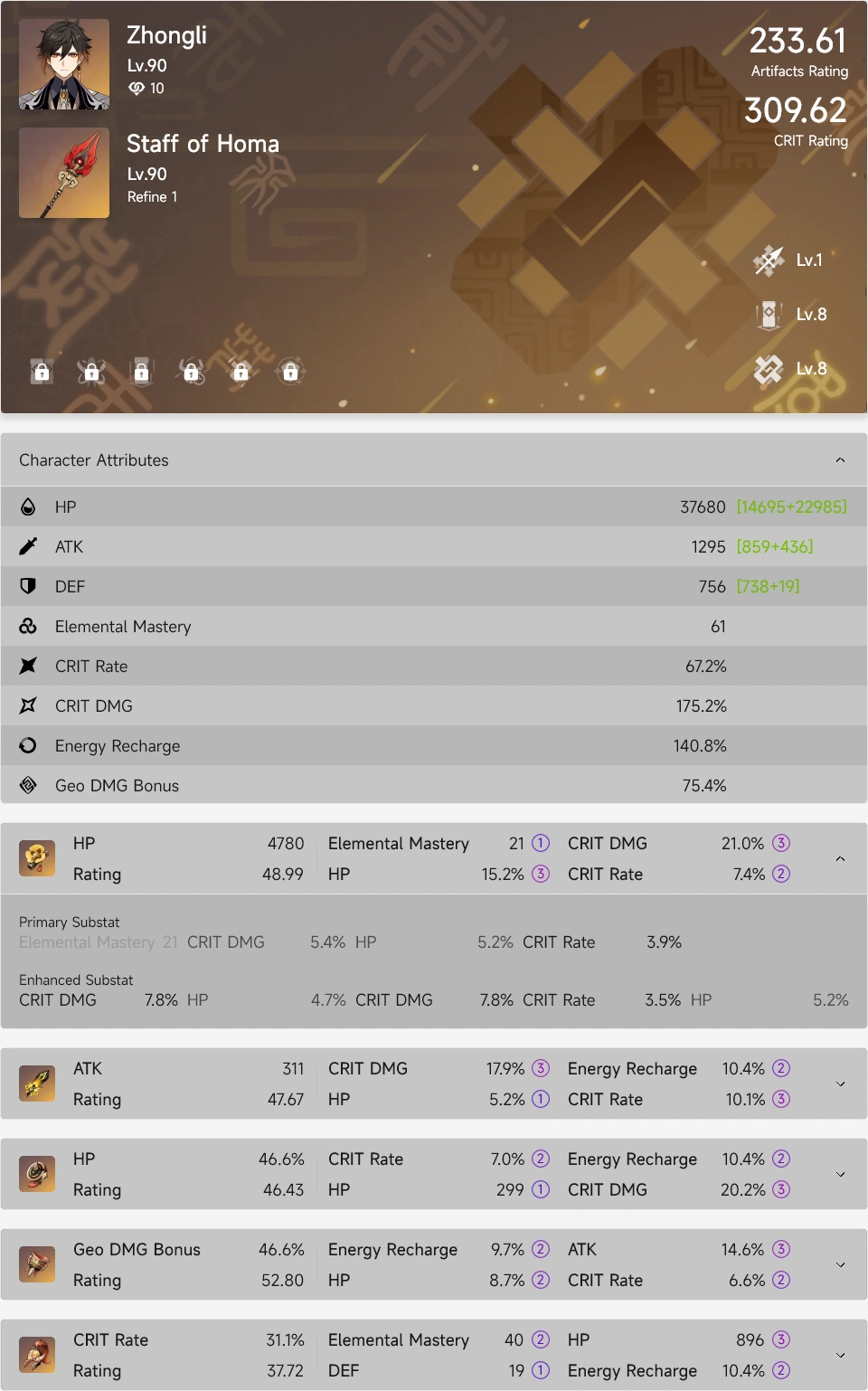
- In `My Characters` page, you can select a character and then click `Export as Image` button to create image with your
|
|
character's data, this will help you to share your character's data
|
|
- The exported image is stored in your clipboard, and you can paste it wherever you need
|
|
- A sample exported image is shown below
|
|
|
|
|