mirror of
https://jihulab.com/DGP-Studio/Snap.Hutao.Docs.git
synced 2025-11-19 21:16:31 +08:00

36 lines
1.6 KiB
Markdown
36 lines
1.6 KiB
Markdown
---
|
|
headerDepth: 0
|
|
category: [Feature, Tutorial]
|
|
order: 2
|
|
tag: [Dashboard, Announcement, Snap Hutao Cloud]
|
|
redirectFrom: /features/character-wiki.html
|
|
comment: false
|
|
---
|
|
|
|
# Home Dashboard
|
|
|
|
|
|
|
|
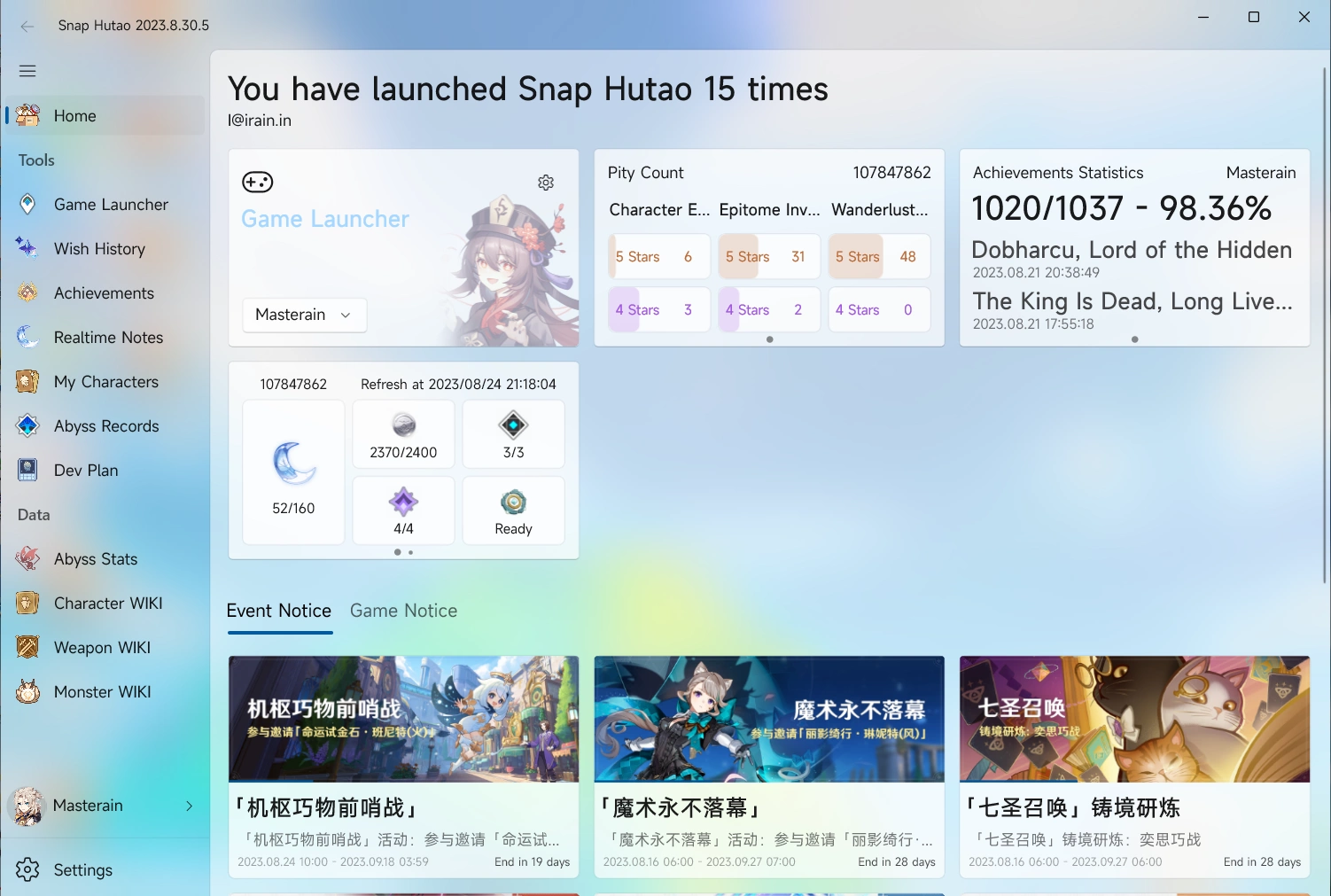
Snap Hutao will enter home dashboard by default when it's opened. The top part is your personal gaming data; the bottom
|
|
part is recent game notice and event countdown in days and hours.
|
|
|
|
Gaming data dashboard includes:
|
|
|
|
- Snap Hutao Announcement
|
|
- If Snap Hutao dev team publish a new announcement, it will be shown on the dashboard, it can be manually closed
|
|
- Snap Hutao Account
|
|
- If you have a signed in Snap Hutao account, the email address will be shown on the top; If not signed in, there will
|
|
be a register/login hint
|
|
- Game launcher
|
|
- You can select your account and start the game from dashboard
|
|
- Wish history
|
|
- Game UID and progress bar styled pity count will be display in the dashboard
|
|
- If you have multiple wish history archives, you can use arrow button on left and right side of chart to switch archive
|
|
- Achievement statistics
|
|
- Achievement statistics charts includes gained achievements count, percentage, and the latest gained achievements
|
|
- If you have multiple achievement archives, you can use arrow button on left and right side of chart to switch archive
|
|
- Real-time Notes
|
|
- Real-time notes data will be displayed on home dashboard
|
|
- If you have multiple activated real-time notes account, you can use arrow button on left and right side of
|
|
chart to switch account
|