mirror of
https://jihulab.com/DGP-Studio/Snap.Hutao.Docs.git
synced 2025-11-19 21:16:31 +08:00
 b8ceb907c7
* update

* win10 uninstall

* add notes about root

* format

* modify

* update

* Update FAQ.md

* Update navbar

* Update docs

* Update Gacha-system-and-export-principal.md

* correct

* update

* disambig

* update

* add warning for auto-start (need re-update)

* update

* add a tabular for showing differences in each way for sync

* center tabular

* switch to md format

* update vs

* add some

* RE-update tabualr

* update

* correct

* update

* move web login to the end

* Update game-launcher.md

* Update docs

* Update character-data.md

---------

Co-authored-by: LinkChou <linkchou@yandex.com>
Co-authored-by: Masterain <i@irain.in>
2.5 KiB
2.5 KiB
headerDepth, icon, category, order, description, banner
| headerDepth | icon | category | order | description | banner | |
|---|---|---|---|---|---|---|
| 2 | iconfont icon-ask |
|
1 | This page lists common issues and solutions related to user networking and program lifecycle problems. | https://opengraph.snapgenshin.cn/generate?url=https://hut.ao/en/advanced/faq.html&has_description=False |
Other FAQ
How to Create Desktop Shortcut (with No Admin Privilege)
::: tip Community Power
Thanks to CzHUV for the solution.
:::
- Use
Win+Rto start run, in the window inputshell:AppsFolder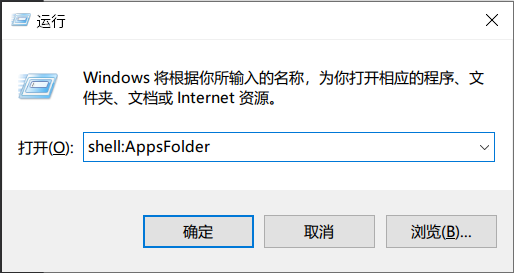
- In the new pop-up window, find Snap Hutao
- Right lick on it, and click
Create shortcut - Confirm the operation and you will get the desktop shortcut
How to Create Desktop Shortcut (With Admin Privilege)
Click Create Desktop Shortcut in the settings page.
How to run Snap Hutao when Windows starts
::: warning
This is a workaround solution. Approaches may fail in practice due to various problems.
:::
- Create a bat file, content refers to this Issue, it allows bat to run Snap Hutao with Administrator privilege
- Create a Scheduled Task, run the bat when Windows startup, or drag it to Windows start folder
Unable to Run Snap Hutao as Administrator
This issue only occurs in Windows 10 older than 22H2 version
- When user's OS version older than
Windows Build 19045(aka Windows 10 22H2), Snap Hutao is unable to start when running as Administrator- This issue comes from Windows kernel, and it's hard to locate, so we suggest you to update your OS to the latest version
Use Snap Hutao with Network Proxy
Snap Hutao has a well-designed cloud network structure, you should be able to get good network service wherever you are located
Loopback network are disabled for all Windows Appx container application (including Snap Hutao), so some modern network proxy software will cause container applications to lose Internet access, and lead to application errors.
If you need network proxy to use Snap Hutao, you can try the following solutions:
- Config in Snap Hutao
- Open
Feedback Centerand clickConfig Loopback Exemptionand follow the instructions
- Open
- Config in network proxy software
- Enable
TUN Modein your network proxy software if it supports - Contact your network proxy software provider for help, ask solution of Windows Appx container application proxy configuration
- Enable