import{_ as r}from"./plugin-vue_export-helper-x3n3nnut.js";import{r as o,o as c,c as s,a as e,b as t,d as a,w as d,e as i}from"./app-cFnOtllV.js";const u={},h=i(' Game Launcher
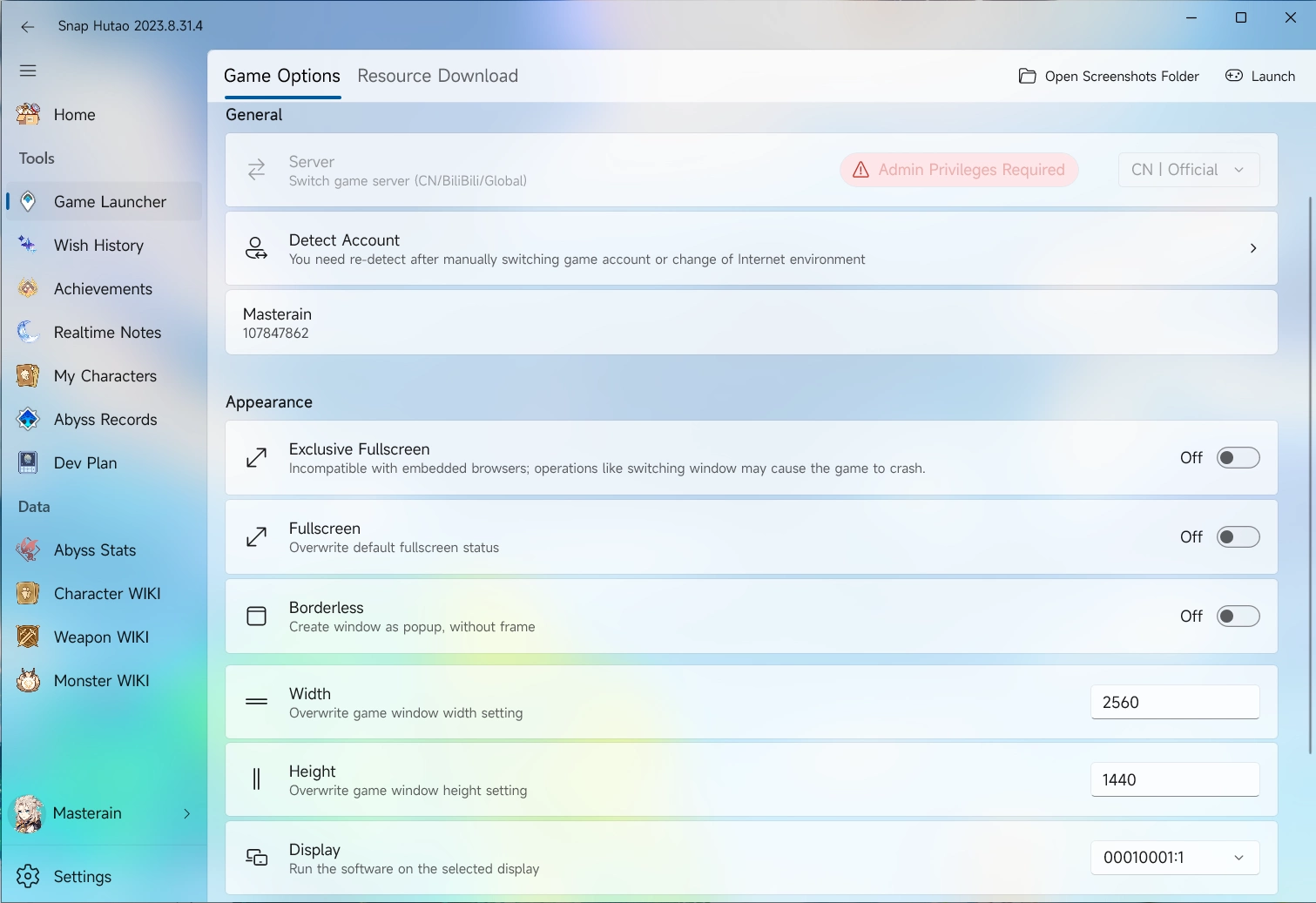
- Snap Hutao offers advanced game launcher feature allows user to launch the game with self-defined settings
- Click on the
Game Launcher on the sidebar to get into game launcher's page - If you are using it at the first time, you will be redirected to Snap Hutao settings page and asked to set your game path
- When choosing the game path, noticed that you should choose game program instead of launcher program
- Such as
$\\Genshin Impact\\Genshin Impact Game\\YuanShen.exe and $\\Genshin Impact\\Genshin Impact Game\\Genshin Impact.exe - Official launcher program is usually
$\\Genshin Impact\\launcher.exe
- You can make launcher configuration options in the game launcher's page, and then click
Launcher button on the top-right to launch the game - Launcher options is explained in the document below
Server Switch
Privilege Notice
- You need to run Snap Hutao as administrator to use this feature
- Snap Hutao will create
ServerCache folder in the data directory to save required sever switch files
Enter Game Launcher page In the General - Server field, select the server you want
- Current available serves options include:
| Option | Server |
|---|
| CN Default | Mainland China server |
| CN Official | Mainland China server, no difference with previous row |
| CN NoTapTap | Mainland China server without TapTap account login method |
| BiliBili | Chinese server with BiliBili account system |
| Global Default | HoYoVerse servers |
| Global Epic | HoYoVerse servers with Epic Store payment gateway |
| Global Google | HoYoVerse servers with Google Pay payment gateway |
- click
Launcher button on the top-right to launch the game, Snap Hutao will download server required files and then launch the game
Game Account Switch
Tips
- The account mentioned in this feature is Genshin game login account instead of HoYoLAB account
- Game account switch feature currently only supporting official CN server
- Enter Game Launcher page
- Click
Detect Account field in the General category, Snap Hutao will detect current Genshin Impact's account login status - In this pop-up window, enter an archive name for this account and click
Confirm - Go back to the game, sign out and sign in to your another account. Repeat step 2 and 3 to add all your account to Snap Hutao
- Each saved account are selectable
- On the right side, there are three buttons, they are:
Bind current user account, bind current activated MiHoYo BBS account with this game account, an UID will be display on this archiveRename, rename current account archive nameDelete, delete current account archive
Appearance
- Enter Game Launcher page
- In the
Appearance category, there are 6 available options: - Exclusive Fullscreen, the game process will run in exclusive fullscreen mode
- You should only use this option when you are able to independently describe technical principles and effects of exclusive fullscreen
- Fullscreen, the game display mode is set to fullscreen
- Borderless, the game display mode is set to borderless
- Width, game window width, such as
1920 - Height, game window height, such as
1080 - Display, users with multiple displays can use this option to set which display to run the game
Resource Download
Game launcher in Snap Hutao also offers resource download feature, which lists real time Genshin Impact (CN server) client package and OTA package. User can click the hyperlink icon on each package's right side to redirect to browser to download them by user favored download tools.
When you are updating the game client, you can do the following steps:
- Update official launcher to the latest
- In
Snap Hutao - Game Launcher - Resource Download, find needed client OTA package and installed language OTA package - Move all package to folder where game client located
- Start official launcher, click on update button. The launcher should skip the download and directly starts to unzip the OTA packages to update client
Advanced Features
Caution
- Be aware: all advanced features are labeled as
Dangeroud Feature; indicating that enabling them means you choose to assume any risk on your own. - You need to enable advanced features in Snap Hutao's settings page
Unlock Frame Rate Limit
',11),_={class:"hint-container caution"},S=e("p",{class:"hint-container-title"},"Caution",-1),k={href:"https://github.com/DGP-Studio/Unlocker",target:"_blank",rel:"noopener noreferrer"},G=i("Run Snap Hutao as administrator
Enter Game Launcher page
At the bottom of the page, you can find Unlock Frame Rate Limit option
- Trigger the switch to enable or disable this feature
- In the
Set Frame Rate Limit field, you can adjust the limit freely
Click Start Game button on the top right
Fact that may cause failure in unlocking frame rate limit:
- Snap Hutao process is not kept in the background
V-Sync is not set to off in the gameMax Framerate limit is not changed in your graphic card settingsPower Saving mode is not disabled in power settings- Your graphic card is not powerful enough
",1);function x(C,H){const n=o("ExternalLinkIcon"),l=o("RouterLink");return c(),s("div",null,[h,e("table",null,[p,e("tbody",null,[g,e("tr",null,[m,f,w,e("td",null,[t("Theoretically Supported "),y,e("a",v,[t("We need community's support for this"),a(n)])])])])]),b,e("div",_,[S,e("ul",null,[e("li",null,[t("The "),e("a",k,[t("Unlocker project"),a(n)]),t(" only affects the UnityPlayer itself, directly affecting the Unity3D engine, and does not have a direct relationship with the game itself. Essentially, it is no different from settings like 120 FPS in mobile devices. However, you should still use it with caution and read the "),a(l,{to:"/en/statements/tos.html"},{default:d(()=>[t("user agreement")]),_:1}),t(" on your own.")])])]),G])}const B=r(u,[["render",x],["__file","game-launcher.html.vue"]]);export{B as default};