Win+R to start run, in the window input shell:AppsFolder 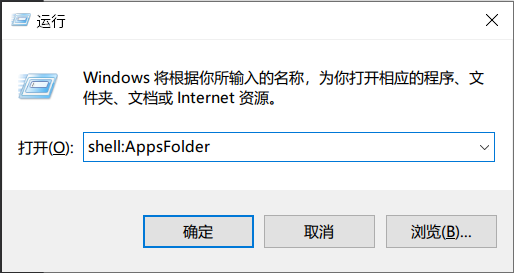
Create shortcutPlease use search bar on the top right or browser built-in search
(ctrl+F)to search keyword such as error code to improve your searching efficiency
Installing Required Framework when Using MSIX Package to InstallPolicy check failed Error when Install with MSIX PackageIf you are using Windows Home Edition, please try to enable developer mode in your system settings and try the installation again.
| Error | Reason |
|---|---|
0x80040154 Error Code | Broken Windows account permission |
The app did not start Error Prompt | Cracked App Installer or broken App Installer permission |
0x80073CF0 Error Code | Broken folder permission |
0x80070005 Error Code | Broken Windows account permission |
0x80070570 Error Code | Broken Windows account permission |
0x8007065E Error Code | Broken Windows account permission |
If you got any of error showing above, please use the following steps to solve the issue:
',5),q=e("li",null,[o("Right click on Windows Start button, and select "),e("code",null,"PowerShell (Admin)")],-1),M=e("li",null,[o("In the PowerShell windows, copy and paste the following command and run it (Right-click is paste feature in PowerShell)"),e("div",{class:"language-PowerShell","data-ext":"PowerShell"},[e("pre",{class:"language-PowerShell"},[e("code",null,`cd $env:USERPROFILE\\Downloads; $url="https://api.snapgenshin.com/patch/hutao/download"; $targetFileName="Snap.Hutao.latest.msix"; $targetFilePath=Join-Path -Path $PWD -ChildPath $targetFileName; Invoke-WebRequest -Uri $url -OutFile $targetFilePath; Add-AppxPackage -Path $targetFilePath; Remove-Item -Path $targetFilePath `)])])],-1),E=e("li",null,[o("If PowerShell does not outcome any error message, then it means installation is successful. Please find "),e("code",null,"Snap Hutao"),o(" in your Start Menu and enjoy it.")],-1),R=i('Probably not if you are asking this, because you are not familiar with your system.
You don't know how many components are missing. When you install the one that tell you in the error message, you will see next missing component in the next error message, endless.
Win+R to start run, in the window input shell:AppsFolder Create shortcutClick Create Desktop Shortcut in the settings page.
You can move this shortcut to any place you need.
This is a workaround solution
',6),O={href:"https://github.com/DGP-Studio/Snap.Hutao/issues/184",target:"_blank",rel:"noopener noreferrer"},L=e("li",null,"Create a Scheduled Task, run the bat when Windows startup, or drag it to Windows start folder",-1),D=i('This issue only occurs in Windows 10 older than 22H2 version
Windows Build 19045 (aka Windows 10 22H2), Snap Hutao is unable to start when running as Administrator Config the game launcher in the settings
Pin Snap Hutao on taskbar
Right click on Snap Hutao and you will see the quick launcher
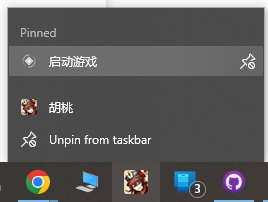
Select Lauch Game, you will be asked which account to start the game
Snap Hutao use saved MiHoYo BBS cookies to maintain login status. If you log out your account in your browser or other device, cookie will become invalid, and Snap Hutao will also be forced to log out, account will be automatically removed.
This problem may also be caused by network error, you should check this first; If it's not caused by network issue, you can use Refresh Cookie in the account panel; You can also remove your account manually and add it back again.
Since October 2022, MiYouShe (Chinese BBS) rapidly increased bot detection and may set users' account as under-risk status, this may cause Snap Hutao failed to check validation of the cookie
config.ini Configuration FileIn some particular conditions (such as wrong game folder permission), config.ini may lose after server conversion. This will cause user not able to get into advanced launcher page and launch the game.
After identify the server version on your device, you can manually create and fill the configuration file with the right content. The following are common configurations.
',15),G=e("div",{class:"language-text line-numbers-mode","data-ext":"text"},[e("pre",{class:"language-text"},[e("code",null,`[General] channel=1 cps=mihoyo game_version=4.1.0 sub_channel=1 plugin_7_version=1.0.0 `)]),e("div",{class:"line-numbers","aria-hidden":"true"},[e("div",{class:"line-number"}),e("div",{class:"line-number"}),e("div",{class:"line-number"}),e("div",{class:"line-number"}),e("div",{class:"line-number"}),e("div",{class:"line-number"})])],-1),Y=e("div",{class:"language-text line-numbers-mode","data-ext":"text"},[e("pre",{class:"language-text"},[e("code",null,`[General] channel=1 cps=mihoyo game_version=4.1.0 sub_channel=0 plugin_7_version=1.0.0 `)]),e("div",{class:"line-numbers","aria-hidden":"true"},[e("div",{class:"line-number"}),e("div",{class:"line-number"}),e("div",{class:"line-number"}),e("div",{class:"line-number"}),e("div",{class:"line-number"}),e("div",{class:"line-number"})])],-1),Q=e("h2",{id:"network-faq",tabindex:"-1"},[e("a",{class:"header-anchor",href:"#network-faq","aria-hidden":"true"},"#"),o(" Network FAQ")],-1),$=e("h3",{id:"use-snap-hutao-with-network-proxy",tabindex:"-1"},[e("a",{class:"header-anchor",href:"#use-snap-hutao-with-network-proxy","aria-hidden":"true"},"#"),o(" Use Snap Hutao with Network Proxy")],-1),z=e("blockquote",null,[e("p",null,"Snap Hutao has a well-designed cloud network structure, you should be able to get good network service wherever you are located")],-1),V=e("p",null,"Loopback network are disabled for all Windows Appx container application (including Snap Hutao), so some modern network proxy software will cause container applications to lose Internet access, and lead to application errors.",-1),j=e("p",null,"If you need network proxy to use Snap Hutao, you have two ways to fix it:",-1),X=e("li",null,[o("Enable "),e("code",null,"TUN Mode"),o(" in your network proxy software")],-1),J={href:"https://www.telerik.com/fiddler/add-ons",target:"_blank",rel:"noopener noreferrer"},K=e("ul",null,[e("li",null,"If network security is not a concern for you, you can use the following PowerShell command to unlock all container loopback limit in your computer")],-1),Z=e("div",{class:"language-PowerShell","data-ext":"PowerShell"},[e("pre",{class:"language-PowerShell"},[e("code",null,`FOR /F "tokens=11 delims=\\" %p IN ('REG QUERY "HKCU\\Software\\Classes\\Local Settings\\Software\\Microsoft\\Windows\\CurrentVersion\\AppContainer\\Mappings"') DO CheckNetIsolation.exe LoopbackExempt -a -p=%p `)])],-1),ee=i('Data Security Warning
Userdata.db contains all client data, including MiHoYO BBS Cookie, please save the data file properly and do NOT share it with anyone.
Copy Userdata.db from Snap Hutao data folder (%userprofile%/Documents/Hutao by default) to your backup location, this file contains entire data of the client.