import{ab as i,H as s,I as r,F as e,V as n,O as o,ad as d,ac as h,Y as a}from"./framework-561d691d.js";const c={},_=e("h1",{id:"为什么",tabindex:"-1"},[e("a",{class:"header-anchor",href:"#为什么","aria-hidden":"true"},"#"),n(" 为什么...")],-1),u=e("p",null,"这篇文档将会列出一些最常见的以“为什么”开头的问题",-1),p=e("h2",{id:"为什么在设置中点击修改游戏路径无效",tabindex:"-1"},[e("a",{class:"header-anchor",href:"#为什么在设置中点击修改游戏路径无效","aria-hidden":"true"},"#"),n(" 为什么在设置中点击修改游戏路径无效")],-1),f=e("p",null,"特定系统版本的用户,由于微软对文件选择对话框的COM实现的差异,会存在点击按钮后无响应的问题。",-1),m={href:"https://github.com/microsoft/WindowsAppSDK/issues/2931",target:"_blank",rel:"noopener noreferrer"},x=e("h2",{id:"为什么程序会出现乱码现象",tabindex:"-1"},[e("a",{class:"header-anchor",href:"#为什么程序会出现乱码现象","aria-hidden":"true"},"#"),n(" 为什么程序会出现乱码现象")],-1),g=e("li",null,[n("当用户在 Windows 10 下使用胡桃且发现有乱码情况时: "),e("ul",null,[e("li",null,[n("可以下载 "),e("code",null,"Segoe Fluent Icons"),n("字体")]),e("li",null,[n("安装时选择"),e("code",null,"为系统所有用户安装"),n(",即可解决问题")])])],-1),k={href:"https://aka.ms/SegoeFluentIcons",target:"_blank",rel:"noopener noreferrer"},b=h(' 为什么解锁帧率后使用心海时出现掉帧
原神的BUG,和我们没关系
为什么会弹出需要使用新应用以打开的对话框
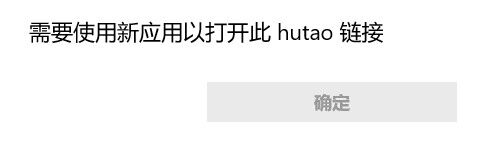
如在卸载胡桃工具箱后出现如上图所示的需要使用新应用以打开此 hutao 链接,说明没有按文档要求在卸载前清除实时便笺定时任务。 请根据文档在设置中清除定时任务后再卸载胡桃工具箱。
为什么米游社帐号登录状态经常失效,添加的帐号消失
',6),C=e("li",null,"我们通过储存帐号的米游社 Cookie 来维持登录状态。",-1),I=e("li",null,[n("但是当用户在浏览器或其它设备上"),e("strong",null,"注销帐号"),n("后, 维持登录状态的 Cookie 将"),e("strong",null,"失效"),n("。")],-1),w=e("li",null,"这会导致胡桃工具箱上的米游社帐号在启动后被自动移除。",-1),B=e("li",null,"此情况也可能因为网络连接问题导致无法检查Cookie有效性,故出现此情况后请优先重启胡桃工具箱。",-1),L=e("h2",{id:"为什么程序会提示注册计划任务失败",tabindex:"-1"},[e("a",{class:"header-anchor",href:"#为什么程序会提示注册计划任务失败","aria-hidden":"true"},"#"),n(" 为什么程序会提示注册计划任务失败")],-1),N=e("p",null,"使用管理员模式使用一次实时便笺后,胡桃的任务计划会被以管理员权限创建。当再次以非管理员模式启动胡桃时,程序在修改计划任务时会缺少权限。 继续使用管理员模式即可解决该问题。",-1);function V(y,F){const t=a("ExternalLinkIcon"),l=a("RouterLink");return s(),r("div",null,[_,u,p,f,e("p",null,[n("相关的 "),e("a",m,[n("Github Issue"),o(t)])]),x,e("ul",null,[g,e("li",null,[n("您可以从 "),e("a",k,[n("微软官方"),o(t)]),n("下载到该字体文件")])]),b,e("ul",null,[C,I,w,B,e("li",null,[n("自2022年10月起,米游社极大地提高了账号被判定为有风险的概率,"),o(l,{to:"/FAQ/mihoyo-risk-tip.html"},{default:d(()=>[n("账号有风险")]),_:1}),n("时亦会令Cookie无法被识别为有效状态")])]),L,N])}const v=i(c,[["render",V],["__file","why.html.vue"]]);export{v as default};