import{_ as r,r as i,o as s,c as l,a as t,b as e,d as a,e as n}from"./app-C6hD0CpO.js";const h={},c=t("h1",{id:"other-faq",tabindex:"-1"},[t("a",{class:"header-anchor",href:"#other-faq"},[t("span",null,"Other FAQ")])],-1),d=t("h3",{id:"how-to-create-desktop-shortcut-with-no-admin-privilege",tabindex:"-1"},[t("a",{class:"header-anchor",href:"#how-to-create-desktop-shortcut-with-no-admin-privilege"},[t("span",null,"How to Create Desktop Shortcut (with No Admin Privilege)")])],-1),p={class:"hint-container tip"},u=t("p",{class:"hint-container-title"},"Community Power",-1),m={href:"https://github.com/DGP-Studio/Snap.Hutao.Docs/issues/12",target:"_blank",rel:"noopener noreferrer"},w=n('- Use
Win+R to start run, in the window input shell:AppsFolder 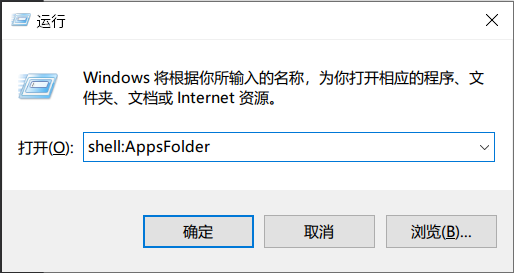
- In the new pop-up window, find Snap Hutao
- Right lick on it, and click
Create shortcut - Confirm the operation and you will get the desktop shortcut
Click Create Desktop Shortcut in the settings page.
This is a workaround solution
',5),g={href:"https://github.com/DGP-Studio/Snap.Hutao/issues/184",target:"_blank",rel:"noopener noreferrer"},k=t("li",null,"Create a Scheduled Task, run the bat when Windows startup, or drag it to Windows start folder",-1),y=n('This issue only occurs in Windows 10 older than 22H2 version
- When user's OS version older than
Windows Build 19045 (aka Windows 10 22H2), Snap Hutao is unable to start when running as Administrator - This issue comes from Windows kernel, and it's hard to locate, so we suggest you to update your OS to the latest version
Snap Hutao has a well-designed cloud network structure, you should be able to get good network service wherever you are located
Loopback network are disabled for all Windows Appx container application (including Snap Hutao), so some modern network proxy software will cause container applications to lose Internet access, and lead to application errors.
If you need network proxy to use Snap Hutao, you have two ways to fix it:
- Enable
TUN Mode in your network proxy software - Unlock Loopback restrictions in Feedback Center
',8);function f(_,v){const o=i("ExternalLinkIcon");return s(),l("div",null,[c,d,t("div",p,[u,t("p",null,[e("Thanks to "),t("a",m,[e("CzHUV"),a(o)]),e(" for the solution.")])]),w,t("ul",null,[t("li",null,[e("Create a bat file, content refers to "),t("a",g,[e("this Issue"),a(o)]),e(", it allows bat to run Snap Hutao with Administrator privilege")]),k]),y])}const b=r(h,[["render",f],["__file","FAQ.html.vue"]]),A=JSON.parse('{"path":"/en/advanced/FAQ.html","title":"Other FAQ","lang":"en-US","frontmatter":{"headerDepth":2,"icon":"iconfont icon-ask","category":["FAQ"],"order":1,"description":"Other FAQ How to Create Desktop Shortcut (with No Admin Privilege) Community Power Thanks to CzHUV for the solution. Use Win+R to start run, in the window input shell:AppsFolder...","head":[["link",{"rel":"alternate","hreflang":"zh-cn","href":"https://hut.ao/zh/advanced/FAQ.html"}],["link",{"rel":"alternate","hreflang":"id-id","href":"https://hut.ao/id/advanced/FAQ.html"}],["link",{"rel":"alternate","hreflang":"ru-ru","href":"https://hut.ao/ru/advanced/FAQ.html"}],["meta",{"property":"og:url","content":"https://hut.ao/en/advanced/FAQ.html"}],["meta",{"property":"og:site_name","content":"Snap Hutao"}],["meta",{"property":"og:title","content":"Other FAQ"}],["meta",{"property":"og:description","content":"Other FAQ How to Create Desktop Shortcut (with No Admin Privilege) Community Power Thanks to CzHUV for the solution. Use Win+R to start run, in the window input shell:AppsFolder..."}],["meta",{"property":"og:type","content":"article"}],["meta",{"property":"og:image","content":"https://img.alicdn.com/imgextra/i3/1797064093/O1CN01Jj8c6i1g6du728e5A_!!1797064093.png"}],["meta",{"property":"og:locale","content":"en-US"}],["meta",{"property":"og:locale:alternate","content":"zh-CN"}],["meta",{"property":"og:locale:alternate","content":"id-ID"}],["meta",{"property":"og:locale:alternate","content":"ru-RU"}],["meta",{"property":"og:updated_time","content":"2024-02-25T05:38:07.000Z"}],["meta",{"name":"twitter:card","content":"summary_large_image"}],["meta",{"name":"twitter:image:alt","content":"Other FAQ"}],["meta",{"property":"article:author","content":"DGP-Studio"}],["meta",{"property":"article:modified_time","content":"2024-02-25T05:38:07.000Z"}],["script",{"type":"application/ld+json"},"{\\"@context\\":\\"https://schema.org\\",\\"@type\\":\\"Article\\",\\"headline\\":\\"Other FAQ\\",\\"image\\":[\\"https://img.alicdn.com/imgextra/i3/1797064093/O1CN01Jj8c6i1g6du728e5A_!!1797064093.png\\"],\\"dateModified\\":\\"2024-02-25T05:38:07.000Z\\",\\"author\\":[{\\"@type\\":\\"Person\\",\\"name\\":\\"DGP-Studio\\",\\"url\\":\\"https://github.com/DGP-Studio\\"}]}"],["link",{"rel":"alternate","type":"application/rss+xml","href":"https://hut.ao/en/rss.xml","title":"Snap Hutao RSS Feed"}]]},"headers":[{"level":3,"title":"How to Create Desktop Shortcut (with No Admin Privilege)","slug":"how-to-create-desktop-shortcut-with-no-admin-privilege","link":"#how-to-create-desktop-shortcut-with-no-admin-privilege","children":[]},{"level":3,"title":"How to Create Desktop Shortcut (With Admin Privilege)","slug":"how-to-create-desktop-shortcut-with-admin-privilege","link":"#how-to-create-desktop-shortcut-with-admin-privilege","children":[]},{"level":3,"title":"How to run Snap Hutao when Windows starts","slug":"how-to-run-snap-hutao-when-windows-starts","link":"#how-to-run-snap-hutao-when-windows-starts","children":[]},{"level":3,"title":"Unable to Run Snap Hutao as Administrator","slug":"unable-to-run-snap-hutao-as-administrator","link":"#unable-to-run-snap-hutao-as-administrator","children":[]},{"level":3,"title":"Use Snap Hutao with Network Proxy","slug":"use-snap-hutao-with-network-proxy","link":"#use-snap-hutao-with-network-proxy","children":[]}],"git":{"createdTime":1679108735000,"updatedTime":1708839487000,"contributors":[{"name":"Masterain","email":"i@irain.in","commits":14},{"name":"qhy040404","email":"qhy040404@163.com","commits":5},{"name":"Mr.Hope","email":"mister-hope@outlook.com","commits":1}]},"readingTime":{"minutes":1.01,"words":302},"filePathRelative":"en/advanced/FAQ.md","localizedDate":"March 18, 2023","autoDesc":true}');export{b as comp,A as data};